
A WordPress child theme allows you to apply custom code and style modifications to your site without editing the parent theme directly. Using a child theme ensures that your custom changes are preserved whenever you update the parent theme to a newer version.
Step 1 – Download the child theme file
Depending on where you obtained your theme, locate and download the child theme zip file following the instructions below.
KeyDesign Pro Theme
If you subscribed to KeyDesign Pro through keydesign.xyz, log in to your myaccount.keydesign.xyz dashboard. Navigate to the downloads section and download the child theme package directly to your computer.
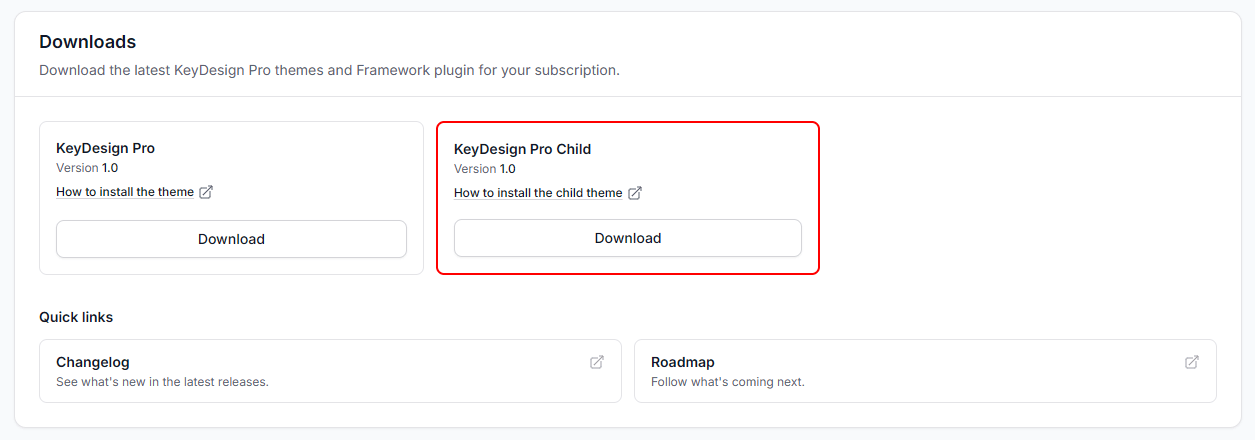
ThemeForest Themes
If you purchased a theme on ThemeForest, the child theme is included inside the main theme package. Download the “All files & documentation” zip file from your ThemeForest Downloads tab, extract the package on your computer, and locate the [theme]-child.zip file.
Step 2 – Install and activate the child theme
Installing a child theme follows the same process as installing any standard WordPress theme.
- Log in to your WordPress admin dashboard.
- Navigate to Appearance > Themes.
- Click the Add New button at the top of the screen, then click Upload Theme.
- Upload the [theme]-child.zip file from your computer and click Install Now.
- Once the installation completes, click Activate to make the child theme active on your site.
Why use a child theme?
Using a child theme provides several key advantages for website maintenance and custom development:
- Modifying theme files directly means your custom code will be overwritten when updating the theme. A child theme keeps your modifications completely separate and safe during updates.
- It allows developers and designers to quickly add custom PHP functions, CSS rules, or template file overrides without touching core theme files.
- It provides a safe environment to learn WordPress development without the risk of breaking the main parent theme structure.
Was this article helpful?
What went wrong?
