
Our themes rely on a small set of plugins to provide all essential functionality. Plugins extend WordPress beyond its default features and are required for building, editing, and managing your website correctly.
After installing your theme, you must install the required plugins to ensure all features and layouts function correctly.
Required plugins
Both the KeyDesign Pro theme and all our ThemeForest themes now require only the following two plugins:
1 KeyDesign Framework: This plugin adds all theme-specific features, custom widgets, and integrations.
2 Elementor (free plugin). This is the drag-and-drop page builder used for editing pages, headers, and footers.
You can enable auto-updates for both plugins, so updates are installed automatically without needing to log in and update them manually.
How to install the plugins
For the KeyDesign Pro theme, you must first register your license before you can install the plugins. You can find detailed steps in the theme activation documentation.
Once your KeyDesign Pro theme is registered, or right after activating a ThemeForest theme, a notification prompt will appear at the top of your WordPress dashboard asking you to install and activate the required plugins.
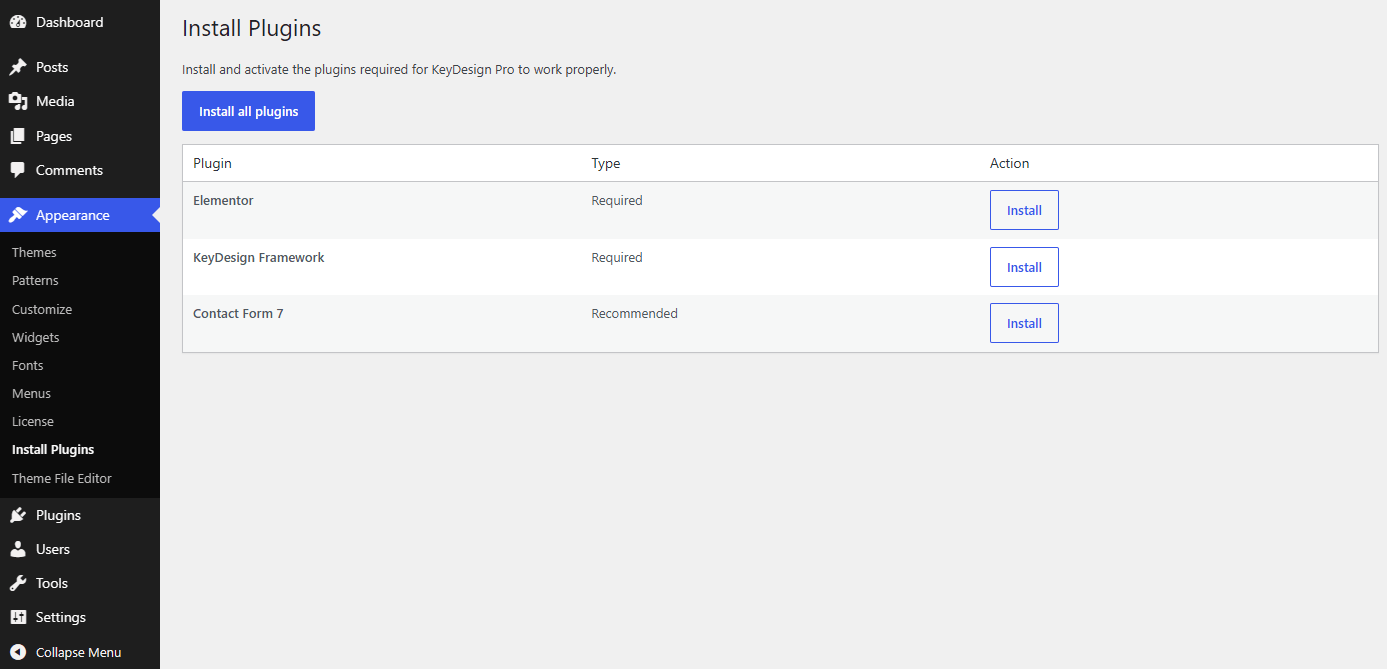
You can also complete this step manually by navigating to Appearance > Install Plugins in your WordPress dashboard, selecting the required plugins, and running the bulk installation.
Notice for older websites
If your website was installed and configured before August 2026 using Sierra, FinPath, LandPress, Amity, Worktop, Joule, Medicora, Karbon, your installation requires two additional legacy plugins:
3 ElementsKit Lite (free plugin). Elementor addon that provides extra widgets and layout features.
4 ElementsKit Pro (included for free). Extends ElementsKit Lite with premium widgets and advanced modules.
These older websites will still require ElementsKit Lite and ElementsKit Pro to maintain compatibility with your existing layouts. We continue to provide bug fixes and plugin updates for ElementsKit compatibility to ensure your site remains secure and functional.
Was this article helpful?
What went wrong?
